Fraud protection.
Now it's personal.
ANZ Falcon® technology monitors millions of transactions every day to help keep you safe from fraud.
Falcon® is a registered trademark of Fair Issac Corporation.


Fraud protection.
Now it's personal.
ANZ Falcon® technology monitors millions of transactions every day to help keep you safe from fraud.
Falcon® is a registered trademark of Fair Issac Corporation.

Fraud protection.
Now it’s personal.
ANZ Falcon® technology monitors millions of transactions every day to help keep you safe from fraud.
Falcon® is a registered trademark of Fair Isaac Corporation.
Direct Loan Payments are an easy way to set up recurring payments to your linked ANZ loan accounts. If you want to know more about the impact of any interest rate changes on your existing direct loan payments, please go to Home loan interest rate changes.

Bank Managed and Customer Managed direct loan payments must all come from an eligible ANZ or ANZ Plus account. If you would like to set up a payment to your ANZ loan from a non-ANZ account, you will need to arrange this via your other financial institution.
You will be unable to have both a Bank Managed and Customer Managed direct loan payment.
Bank Managed direct loan payments act as the primary loan payment method.
If your new minimum loan repayment amount increases and is more than your current direct loan payment amount, your existing direct loan payment amount will be automatically increased.
You can also opt to pay more than the minimum repayment amount with Bank Managed direct loan payments. Find out more about How extra repayments could help pay off your loan sooner.
ANZ may not automatically reduce direct loan payments if your minimum repayment amount decreases as you may wish to pay your loan off sooner and be in control of your repayments. If you would like to reduce your direct loan payment if your minimum repayment amount decreases, you may need to do so manually.
You will need to manually set up Customer Managed direct loan payments, including entering the amount you wish to pay to your loan.
You are responsible for manually changing your direct loan payment amount, where necessary, to ensure you meet the minimum repayment amount.
You can have multiple direct loan payments set up (i.e. coming out of multiple ANZ or ANZ Plus accounts).
If you are a home loan customer updating your direct loan payment amount following an interest rate reduction, please be aware that the new minimum repayment amount must be visible in ANZ Internet Banking before you will be able to request to reduce your direct loan payment amount.
If your minimum repayment amount changes, ANZ will notify you (a digital copy may also be available in ANZ App and/or ANZ Internet Banking). This will outline the new minimum repayment amount and from when it will take effect. You can go into ANZ Internet Banking 6 days prior to your new minimum repayment taking effect to submit your direct loan repayment change request.

Log onto ANZ Internet Banking, if you don't have Internet Banking register now.

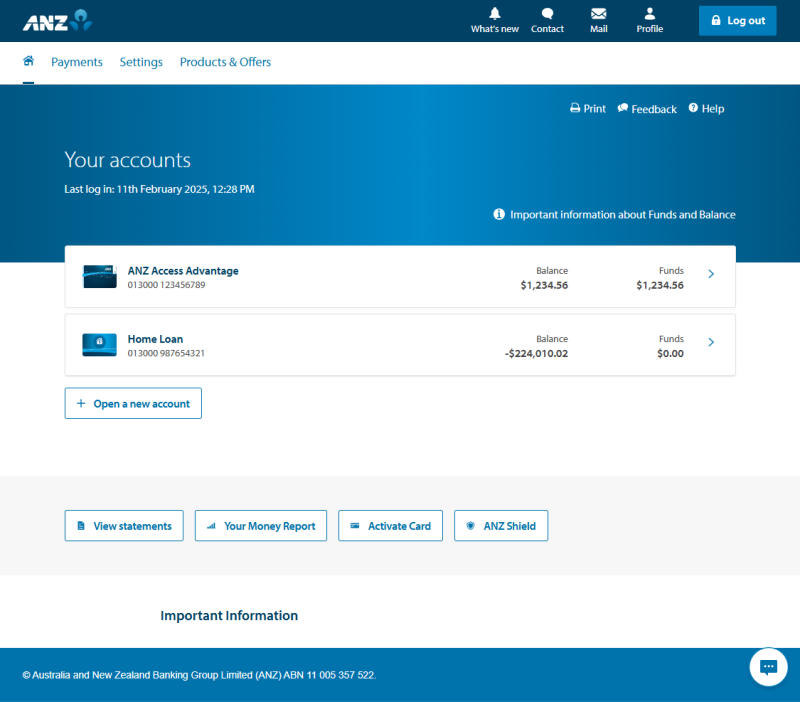
From your home page, select your loan account.

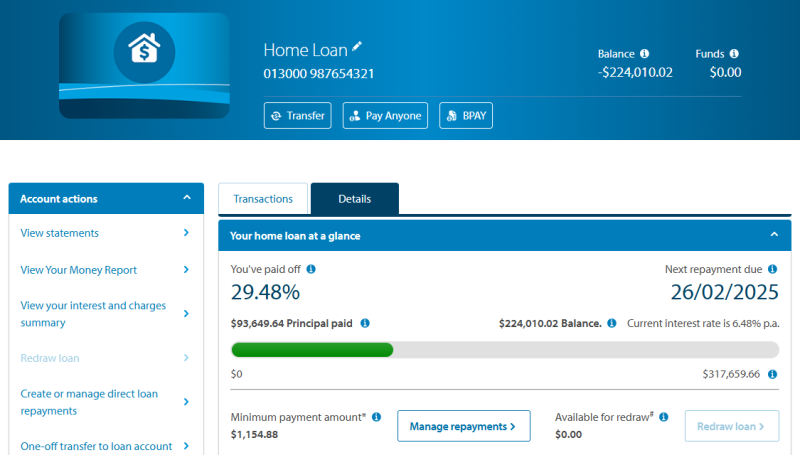
Select the "Create or manage direct loan payments" link under the ‘Account Actions’ menu located on the left-hand side of loan screen.
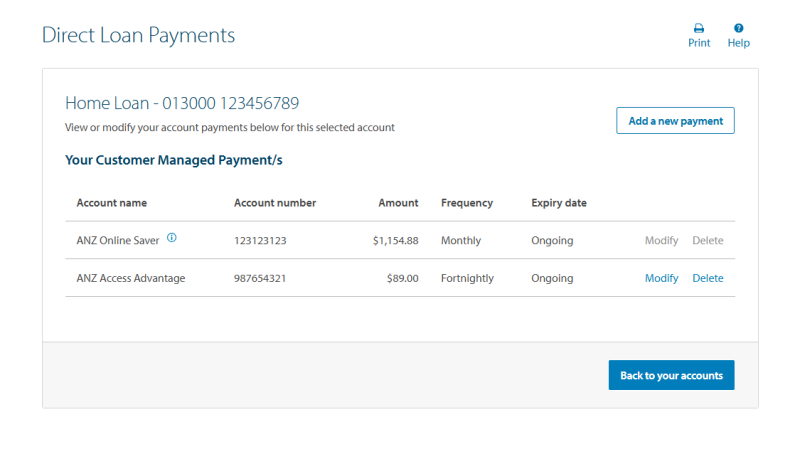
Your direct loan payments list will display. Next:

Select the relevant payment, using the radio buttons under the "Select" column.

Click "Modify"

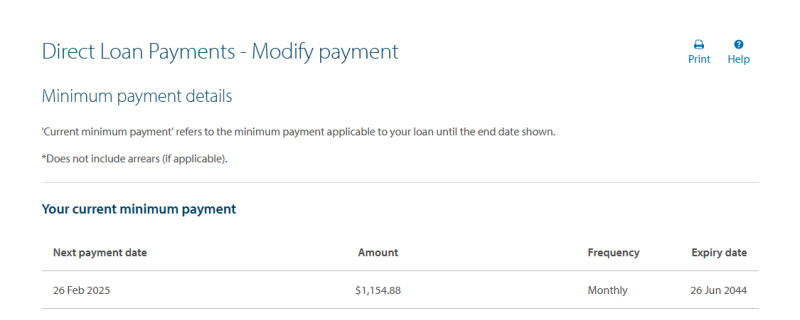
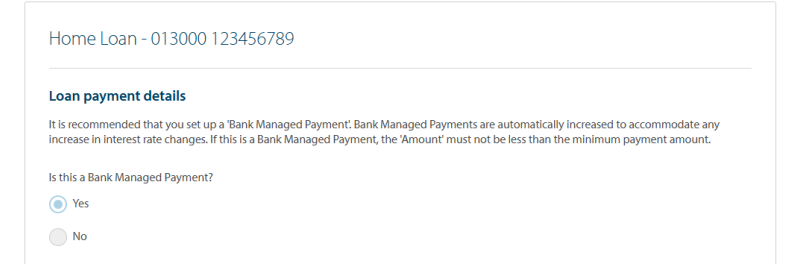
Take note of your current minimum payment amount displayed (this represents the minimum repayment you must make on your loan) then scroll down and follow the next steps:

If you are modifying a Bank Managed Payment (direct loan payment) ‘yes’ should already be ticked. If you are modifying a Customer Managed Payment, please select ‘no’.

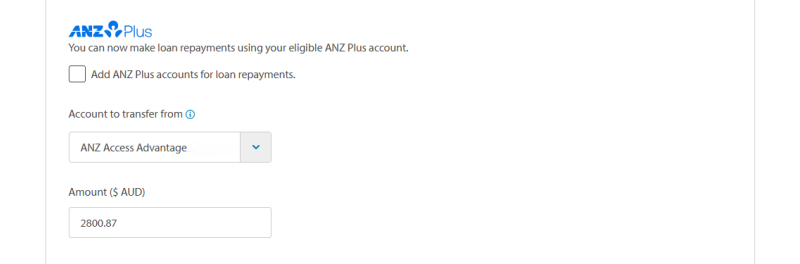
Account to transfer from: select the ANZ or ANZ Plus account you would like to make the direct loan payment from using the drop-down list.

Amount: enter the amount you wish to pay to your loan. If this amount is a Bank Managed Payment, the amount cannot be below the minimum repayment amount, or you will receive an error message. You can scroll to the top of the form to confirm your minimum repayment amount.

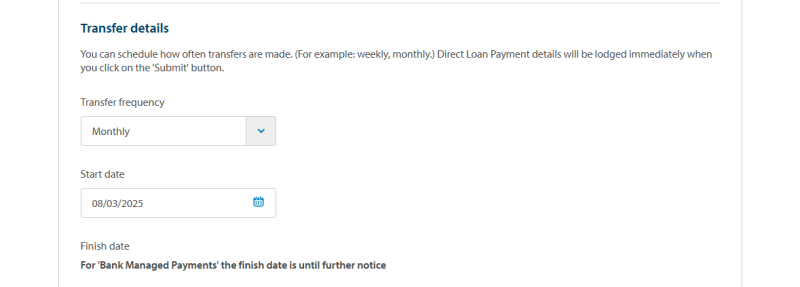
If you are only changing the minimum repayment amount, leave the transfer frequency, start and finish date as pre-populated. There’s no need to change these fields.
If you wish to change the transfer frequency of your direct loan payments (e.g. Monthly to Fortnightly), you can choose your preferred option from the drop down menu. You will also need to select the date of your first direct loan payment at your newly selected transfer frequency.
If you would like to change both the transfer frequency and direct loan payment amount at the same time, follow these steps:

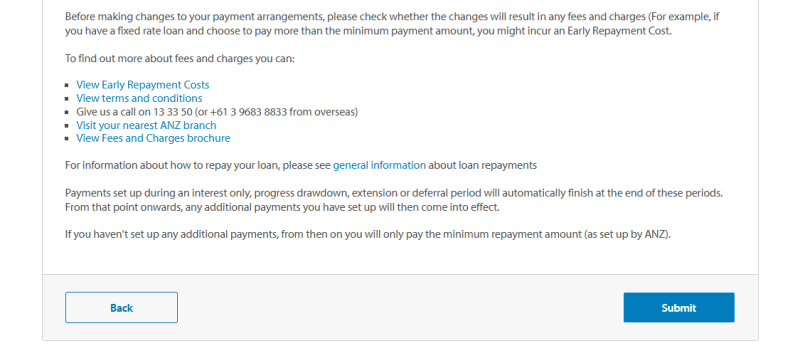
Scroll down to the bottom and read the ‘important information’ section, then select "Submit" to proceed with requested changes to your direct loan payment. We endeavour to complete all changes within two business days, except during periods where we are experiencing a larger volume of requests i.e. following an ANZ interest rate announcement.

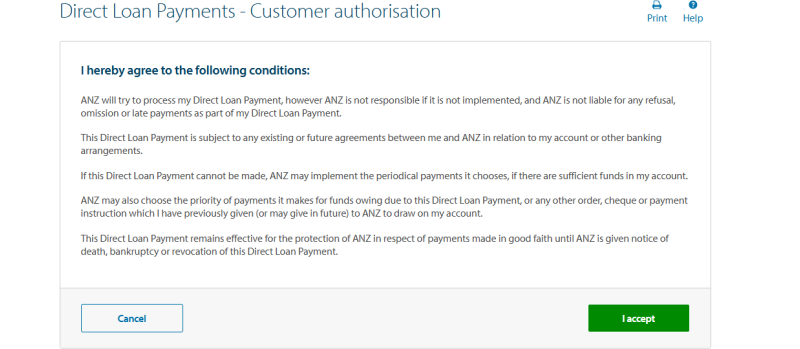
Read and accept the conditions on the "Direct Loan Payment - Customer Authorisation" page by clicking "I accept".
Once you accept the customer authorisation the "Direct Loan Payment - Lodgement Receipt" page will display, showing the loan payment request details and the requested payment instructions.
Depending on the loan payment request and changes required, the direct loan payment may be set up straight away or sent to the ANZ Home Loans Team to process your request.
We aim to process your direct loan payment request within two bank business days, however this may take longer during periods where we are experiencing an increased volume of requests.
Keep an eye on SecureMail in ANZ Internet Banking as this is how we will contact you if we need further information to progress your request.
Message us in the ANZ App for support when you need it.
Send us a SecureMail in ANZ Internet Banking.
For further assistance, if you are a home loans customer call ANZ Home Loans on 13 25 99 Mon-Fri 8am – 7pm (AEST). For all other product types please call the ANZ Internet Banking team on 13 33 50 (International callers: +61 3 9683 8833).